

Before creating a proper cloud backup, most people just start dragging files into whatever cloud folder they have available. The result is a messy, oversized backup full of duplicates, outdated files, and forgotten junk. The smarter approach is to analyze your storage first, clean it up, and only then move everything into a unified backup destination. That’s exactly the workflow Air Cloud Analyzer and Air Cluster make possible when used together.
What Is Air Cloud Analyzer
Air Cloud Analyzer is a desktop tool for Windows and Mac designed to give you a clear, visual breakdown of how your storage space is actually being used, both locally and across your cloud accounts. Instead of blindly uploading files, you get a full scan that identifies large files, old files that haven’t been touched in years, and duplicates scattered across different folders or even different cloud providers. This turns storage management from guesswork into a data-driven decision, showing you exactly what deserves a spot in your backup and what’s just taking up space.
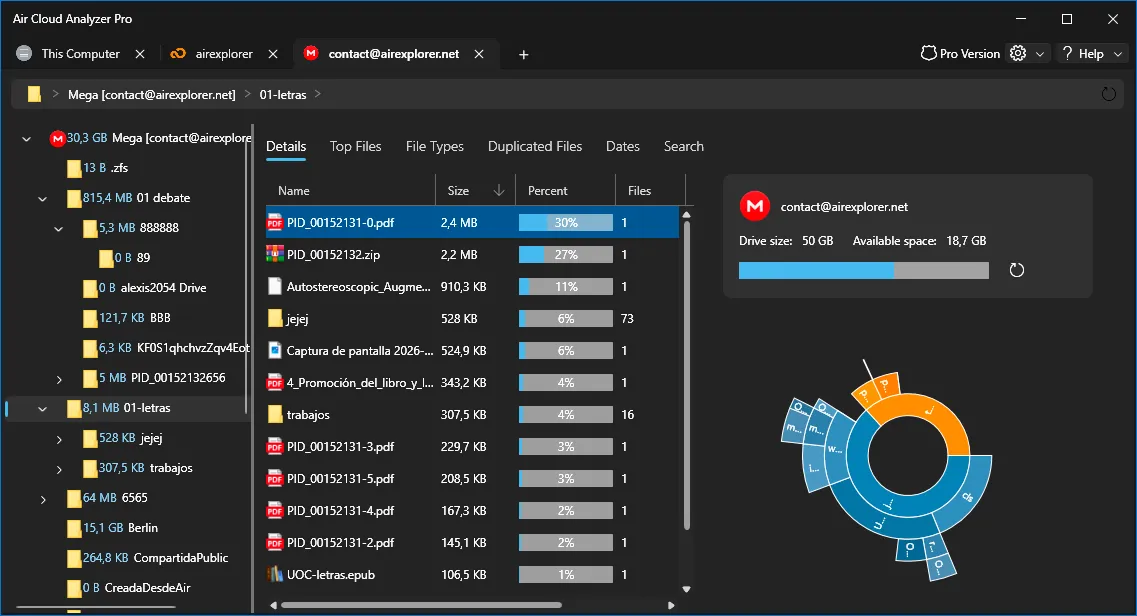
The tool works across multiple cloud accounts simultaneously, so you don’t need to log into each provider separately to see where your gigabytes are going. It centralizes that visibility into a single dashboard, making it far easier to spot patterns like redundant copies of the same document saved in three different clouds, or a folder of old photos duplicated on your PC and in Google Drive.
Air Cloud Analyzer - Analyze your cloud in seconds
What Is Air Cluster
Air Cluster takes a completely different approach from a typical multi-cloud manager. Rather than showing your cloud accounts as separate, isolated drives, it fuses them into one single logical volume using Cloud Pooling technology. You can combine multiple accounts, even from the same provider, into what functions as one large virtual hard drive with hundreds of gigabytes of combined capacity. Once that cluster is created, you can sync, back up, and organize files inside it just as you would with any local disk, without worrying about which specific account each file physically lands in.
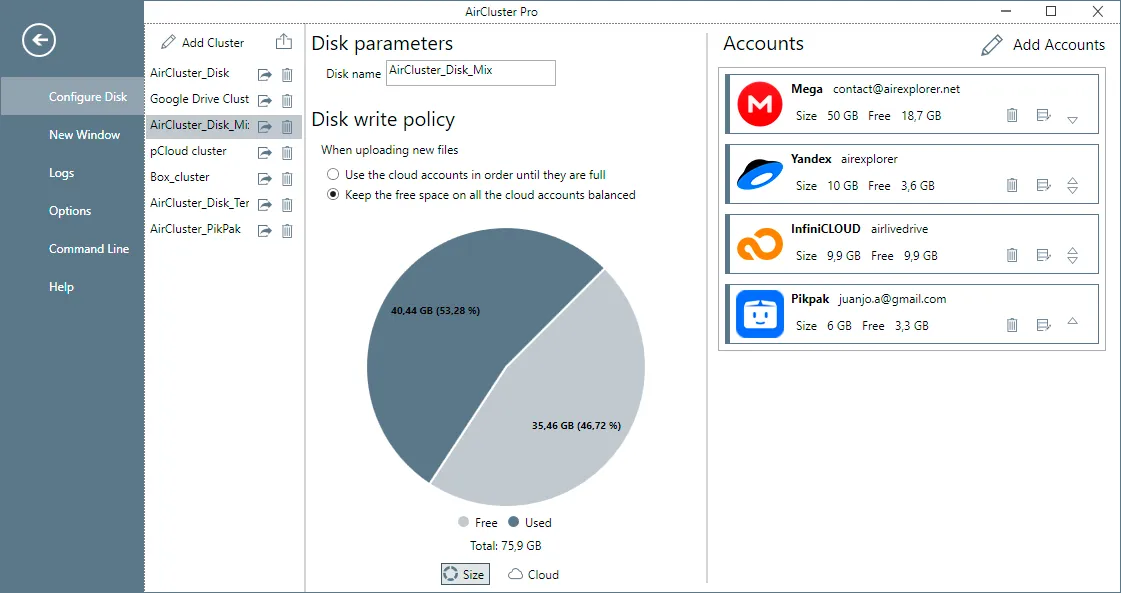
This pooling approach is particularly useful for people who accumulate several free-tier cloud accounts over time and end up with fragmented, hard-to-manage storage. Air Cluster essentially stitches those fragments into one coherent whole.aircluster
Why Combine the Two Tools
Using Air Cloud Analyzer and Air Cluster together follows a natural two-step logic: analyze and clean first, then consolidate and back up. Running the analysis before building your cluster ensures you’re not wasting valuable pooled space on files that shouldn’t be there in the first place.
| Step | Tool | Purpose |
|---|---|---|
| 1. Scan and identify | Air Cloud Analyzer | Detect duplicates, oversized files, and outdated content across local and cloud storage |
| 2. Clean up | Air Cloud Analyzer | Delete or archive unnecessary files to free up real space |
| 3. Build unified storage | Air Cluster | Merge multiple cloud accounts into one large pooled volume |
| 4. Upload and organize | Air Cluster | Sync the cleaned files into the cluster for a complete, ordered backup |
Building a Complete and Organized Backup
The practical benefit of this combined workflow is a backup that is both complete and efficient. Once Air Cloud Analyzer has flagged the duplicates, the ancient files nobody needs anymore, and the oversized items eating up quota, you clean house before anything gets copied. Only then do you open Air Cluster, connect your various cloud accounts into a single cluster, and begin transferring the already-organized files into that unified space.
Because the files have already been sorted and pruned, the resulting backup avoids the common problem of cloud storage filling up with redundant copies of the same content. Every gigabyte inside the cluster is doing useful work, rather than storing three versions of the same spreadsheet or a decade-old temp file that was never deleted. Air Cluster’s sync and backup tools then keep this consolidated volume up to date going forward, meaning the discipline established during the analysis phase carries through automatically over time.

A Practical Two-App Routine
For anyone juggling multiple free cloud accounts, this pairing solves two separate headaches with one workflow. Air Cloud Analyzer handles the diagnostic work, showing exactly where storage is being wasted, while Air Cluster handles the structural work, turning scattered accounts into one large, manageable backup destination. Together, they replace the trial-and-error approach to cloud backups with a repeatable process: scan, clean, pool, and sync.
This also means backups stay lean over time rather than growing indefinitely. Instead of just adding more cloud accounts whenever storage runs out, users can periodically re-run Air Cloud Analyzer to catch new duplicates or aging files, then let Air Cluster’s unified structure absorb the cleaned-up data without needing to reorganize everything from scratch. The end result is a cloud backup strategy that stays both comprehensive and genuinely space-efficient, something neither tool fully achieves alone.
You can check more information about more features here:
-How to Schedule Backups Across Multiple Cloud Accounts
-Sum Your Clouds and Cut Subscriptions: How to Turn Free Cloud Accounts Into One Bigger Storage Space
-Limitless Efficiency: Set It Up Once, Let Air Cluster Sync Forever