
Stop Wasting Time on Manual Backups
Every minute you spend manually copying files, triggering syncs, or chasing down missed backups is a minute stolen from work that actually grows your business. Automated cloud backup isn’t a luxury reserved for big tech teams, it’s the baseline standard for anyone serious about productivity in 2026.
A task Scheduler lets you configure any process once and run it automatically, on your exact schedule, without lifting a finger. And with Air Cluster’s built-in Scheduler, that power extends across every cloud account you own, all from one single dashboard.
What Is a Task Scheduler? (And Why It’s a Game-Changer)
A Scheduler works on three core elements: triggers, actions, and frequency. You define when something should happen, what it should do, and how often. That’s it. No scripts, no babysitting, no forgotten backups.
The three types of triggers you’ll use most:
- Time-based triggers: run tasks at a fixed time, every night at 2:00 AM, every Monday morning, or every hour on the dot
- Event-based triggers: fire off a process the moment something changes, like a new file appearing in a folder or a cloud update detected
- Priority queuing: automatically handles task conflicts so nothing crashes or gets skipped during peak execution windows
Once configured, your infrastructure runs itself, and that’s exactly the point.

Are You Still Doing This Manually? Here’s What It’s Costing You
If you don’t have a Scheduler running today, chances are you’re leaking time and risking data loss in ways you might not even realize:
- Running cloud backups by hand instead of on a set-it-and-forget-it schedule
- Missing weekly reports because someone forgot to hit send
- Leaving overnight hours completely idle instead of running heavy sync jobs during off-peak times
- Creating a single point of failure by tying critical processes to one person’s memory
The fix isn’t complicated. It just requires the right tool, and Air Cluster makes it simpler than ever.
Air Cluster: Multi-Cloud Sync and Automated Backup, All in One Place
Air Cluster is a multi-cloud storage manager that lets you combine all your cloud accounts (Google Drive, OneDrive, Dropbox, MEGA, and more) into one unified virtual drive called a cluster. Think of it as a single, massively expanded cloud built from everything you already have.
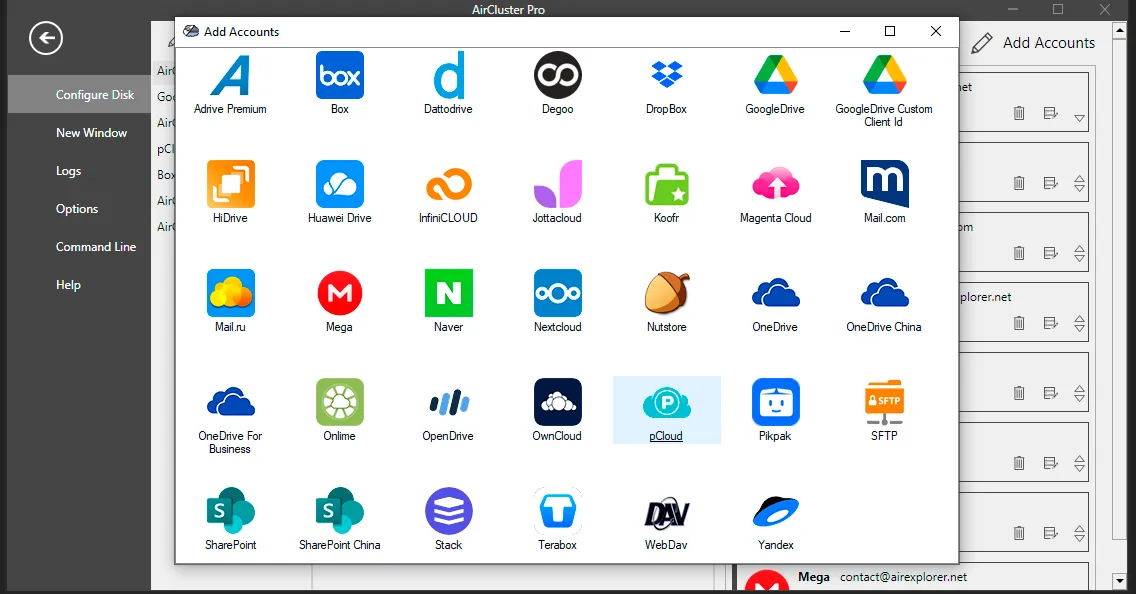
But the real productivity unlock is Air Cluster’s native Task Scheduler. Unlike third-party automation tools that require complex API setups, Air Cluster’s Scheduler is fully integrated, it already knows your clusters, your folder structure, and your sync settings. You don’t need to be a developer to use it. You just need ten minutes.
How to Set Up Automated Cloud Backup with Air Cluster’s Scheduler
Follow these three steps to get your first automated backup running today:
Step 1 — Build and save your sync
Open the Synchronization tool in Air Cluster. Choose your source folder, a local drive, a specific cloud account, or an entire cluster, and set your destination. Pick your sync mode (one-way backup, two-way sync, mirror, etc.) and save it. This saved sync becomes the engine of your automated task.
Step 2 — Open the Task Scheduler and add your task
Head to the Task Scheduler section in the Air Cluster menu. Click “Add,” load the sync you just saved, and you’re already halfway done. Because the Scheduler is natively integrated, it pulls all your cluster parameters automatically, no manual configuration, no connection strings, no headaches.
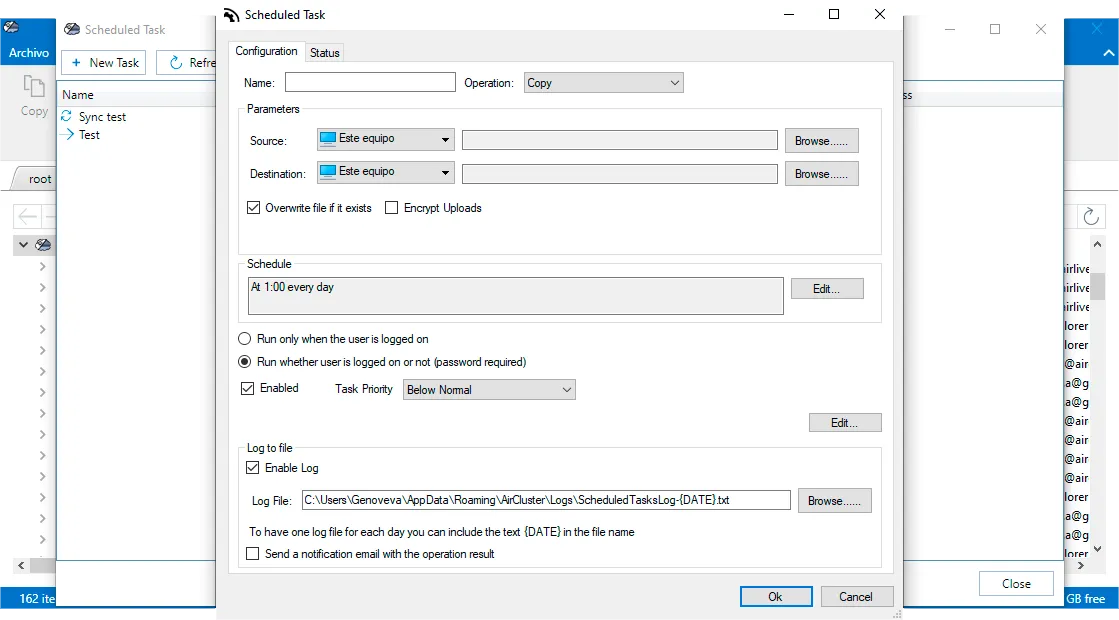
Step 3 — Set your schedule and turn on logging
Now set the frequency that matches your needs:
- Daily at 2:00 AM: the gold standard for business backups, zero impact on daytime bandwidth
- Weekly on Sunday nights: great for project archives and non-critical file sets
- Every few hours or minutes: for teams that need near real-time multi-cloud sync automation
Enable log saving before you hit confirm. Logs give you a timestamped record of every execution, invaluable for compliance, troubleshooting, or simply knowing your data is safe. Hit accept, and Air Cluster runs the rest on autopilot.
The Multiplier Effect: When Everything Syncs on Time
There’s a difference between automating a task and truly synchronizing your entire workflow. The best Schedulers don’t just run jobs in isolation, they ensure every system in your stack is up to date at exactly the right moment.
With Air Cluster’s multi-cloud sync automation, your team’s shared files are current before the 9:00 AM standup. Your client backups are done before anyone opens a laptop. Your disaster recovery window shrinks from “whenever someone remembers” to zero. That’s not just efficiency, that’s operational resilience.
Ready to Automate? Start Today, It Takes Less Time Than You Think
The most productive teams aren’t working harder. They’ve built systems that work for them around the clock. Air Cluster’s Scheduler is one of the fastest ways to get there: no complex setup, no ongoing maintenance, no missed backups.
Try Air Cluster today and set up your first automated cloud backup in under 10 minutes. Your future self, the one not scrambling to recover lost files, will thank you.
You can check more information about more features here:
-Manage Your Storage Clusters on a Scheduled Basis
-Air Cluster vs MultCloud: Which One Do You Actually Need?
-Cloud Automation: Discover the Air Cluster Task Scheduler