
Pool all your cloud accounts into one giant storage space
Air Cluster merges your Google Drive, OneDrive, Mega and Dropbox accounts into a single storage space. A multi-cloud manager for Windows: add up hundreds of gigabytes without paying for subscriptions and manage everything from one app.
More cloud storage
Add up the space of all your accounts, free or paid, and make use of every gigabyte you already have.
Cloud backup
Back up large folders using the space of all your accounts at once.
Cloud sync with your PC
Keep your Windows folders and cloud accounts up to date from one app.
How Air Cluster pools your cloud accounts into one
Built for everyone: set up your cluster in minutes and let Air Cluster do the rest.
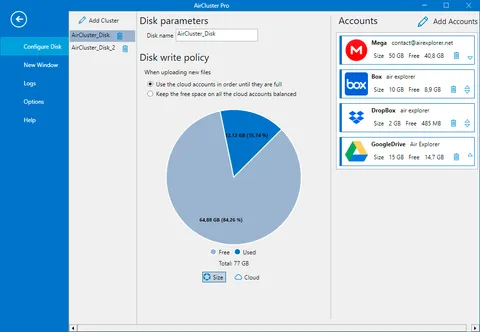
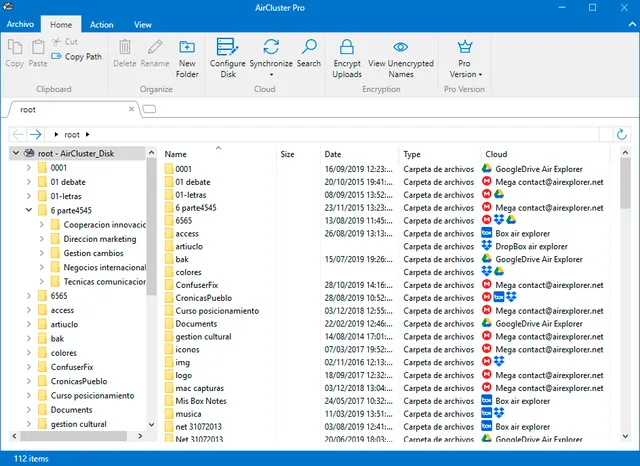
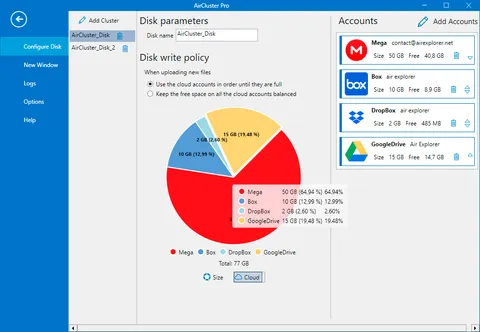
Create a cluster, add your cloud accounts, and Air Cluster treats them as one single storage space inside the app, with their combined capacity. Schedule automatic backups and synchronizations, or manage your files manually, all from one interface.

Step-by-step guide: how to combine multiple cloud storage accounts for free
Everything you need to maximize your cloud storage
More than a way to manage multiple cloud accounts: each account you add expands your total capacity.
SYNC FOLDERS YOUR WAY
Choose mirror, mirror update, update or bidirectional to sync your clouds and your PC, with filters by name, size and date and a report for every sync.
SCHEDULED BACKUPS
PROSchedule uploads, downloads, transfers and syncs with Air Cluster's task scheduler: once, daily, weekly or monthly, and get an email with the result.
CLOUD STORAGE ENCRYPTION
PROEncrypt your files on your computer before uploading, including file and folder names. Only your password opens them.
SEARCH FILES ACROSS ALL YOUR CLOUDS
Find any file, or its duplicates, by searching every account in the cluster at once, without opening them one by one.
MANAGE YOUR CLUSTER FROM THE COMMAND LINE
PROUpload, download, copy, move or rename files with commands and wildcards, run saved syncs and add Air Cluster to your scripts to automate backups.
SHARE, PLAY AND EDIT
Create download links and send them by email, stream videos from the cloud and open your files with your usual programs.
Compatible with 30+ cloud storage services
Air Cluster works with Google Drive, OneDrive, Mega, Dropbox, Box, pCloud, SFTP, WebDAV and many more. Connect your accounts in seconds and start combining your free cloud storage.
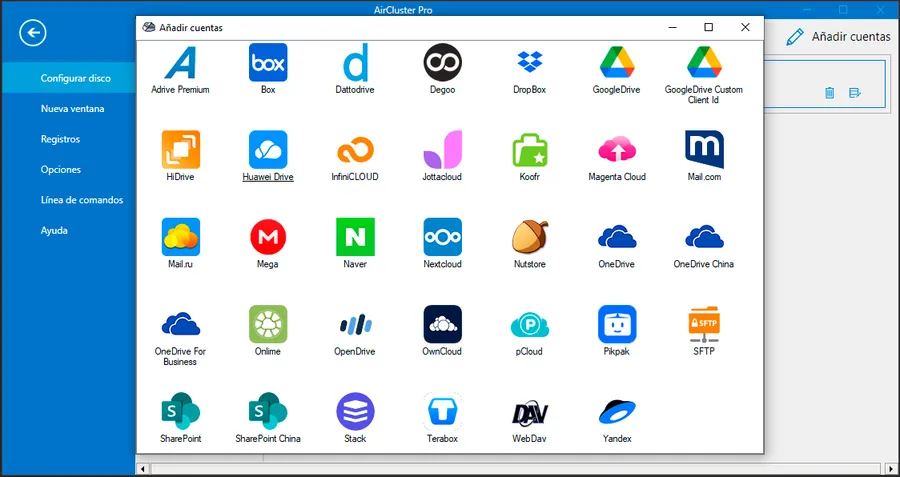
Guides to combining several accounts of:
Need more? Air Cluster Pro removes the limits and adds scheduled backups, encryption and the command line.
See Air Cluster ProFAQs
Common questions about Air Cluster
What is Air Cluster?
Air Cluster is a Windows program that combines several cloud storage accounts (Google Drive, OneDrive, Dropbox, Mega and 30+ services) into a single storage space with all their capacity added up. From one app you can upload, search, sync and back up your files.
Can I combine the storage of multiple cloud accounts to get more space?
Yes. You can combine Google Drive, OneDrive, Mega, Dropbox and other clouds, even several accounts from the same service, and Air Cluster adds up the available space of all of them. For example: Google Drive (15 GB) + Mega (20 GB) + OneDrive (5 GB) = 40 GB in a single cluster.
Does Air Cluster increase the actual storage of my accounts?
It does not change the storage quota of each provider. Air Cluster pools the available space from the accounts you add so you can use their combined capacity as one cluster.
Where are my files stored?
In the cloud accounts that make up your cluster. Air Cluster decides which account stores each file according to the write policy you choose: fill the accounts in order or keep the free space balanced. When an account is full, it keeps saving to the ones that still have space.
Does Air Cluster create a drive in Windows Explorer?
No. The cluster appears as one storage space inside the Air Cluster app. If you want your clouds to show up as a drive letter in Windows Explorer, that is what Air Live Drive does.
What happens to the files already in my accounts?
They stay where they are: nothing is moved or deleted. When you add the account to the cluster, those files and folders appear inside the cluster and take up part of its space.
Is it safe to connect my clouds to Air Cluster?
Yes. Each provider shows its own authorization screen and you grant only the permissions it requests so Air Cluster can view, upload or sync your files. With Air Cluster Pro you can also encrypt your files on upload so only your password opens them.
Which versions of Windows does Air Cluster run on?
Air Cluster runs on Windows 7, 8, 10 and 11.
What is the difference between Air Cluster and Air Explorer?
Air Cluster combines the space of several accounts into a single cluster, ideal for gaining space and backing up. Air Explorer is a multi-cloud file manager for browsing each account separately and transferring files between them. They are complementary tools.
AIR EXPLORER · AIR LIVE DRIVE · AIR CLOUD ANALYZER
Complete your experience

For a multi-cloud file manager and synchronization tool, we recommend the companion application Air Explorer.
Air Explorer
And with Air Live Drive, connect your clouds as disk drives on your computer and work with the clouds as local disks.
Air Live Drive
Air Cloud Analyzer shows you how your storage space is being used and lets you manage all your cloud accounts from a single dashboard.
Air Cloud Analyzer