

Manage Your Storage Clusters on a Scheduled Basis
Mastering the Chaos of Fragmented Storage
In today’s digital economy, data is the most critical asset for any enterprise. However, most professionals operate within a mosaic of services: a few gigabytes in Google Drive, a shared folder in OneDrive, and perhaps legacy files in Dropbox or Mega. This fragmentation doesn’t just slow down your workflow; it creates “blind spots” in your data security strategy.
Manually managing these files, uploading, downloading, and dragging folders between browser tabs, is a recipe for human error. The professional solution isn’t acquiring more isolated services; it’s about pooling capabilities. With Air Cluster, we transform that chaos into a unified, and most importantly, scheduled storage system.

What is a Storage Cluster and Why Should You Schedule It?
A storage cluster is a logical architecture that groups multiple cloud storage accounts (from one or several providers) so they function as a single, high-capacity disk drive.
Why is scheduling its management vital? Scheduling removes the dependency on user memory. By automating synchronization and backup tasks, you guarantee Business Continuity, optimize bandwidth usage by performing transfers during off-peak hours, and ensure that an updated backup always exists without you having to lift a finger.
Step 1: Creating the Cluster (Building the System Foundations)
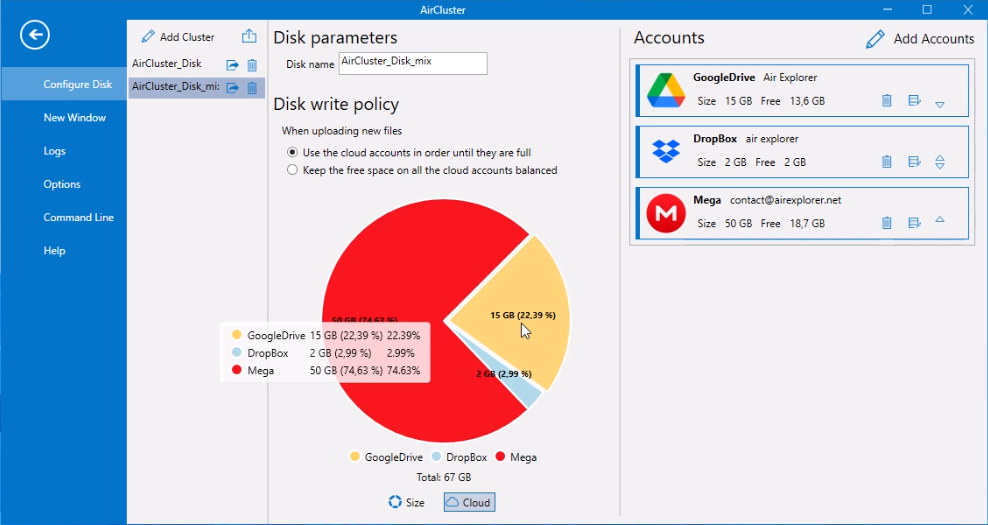
Before moving files, we must define our logical container. Air Cluster allows you to create multiple clusters based on your needs (e.g., one for personal files, another for corporate backups).
- Access: Open Air Cluster and navigate to the Configure Disk sidebar tab.
- Creation: Click the Add Cluster button.
- Identification: Assign a name that clearly identifies its purpose, such as
Corporate_Production_2025. - Disk Write Policy: This is a crucial technical setting.
- Use accounts in order: Ideal if you want to deplete space in specific accounts before using others.
- Keep free space balanced: Recommended for maintaining consistent performance and preventing a single cloud provider from reaching capacity too quickly.
Step 2: Adding Clouds to the Cluster (Scaling Your Power)
With an empty cluster, the next step is providing it with actual storage. Air Cluster’s competitive advantage lies in its compatibility with nearly every provider on the market.
- Click Add Accounts within the panel of your newly created cluster.
- Choose from providers like Google Drive, OneDrive, Dropbox, Box, Mega, Naver, Mail.ru, Yandex, and standard protocols like WebDAV or SFTP.
- Account Configuration: You can, for instance, add five free 15GB Google Drive accounts to instantly create a 75GB cluster at no additional cost.
- Once authorized, Air Cluster’s pie chart will display your total available space, used space, and the health of each connected account in real-time.
Step 3: Configuring Scheduled Backups (The Automation Engine)
Now that your cluster “sees” all your clouds as a single drive, it’s time to configure the system’s intelligence.
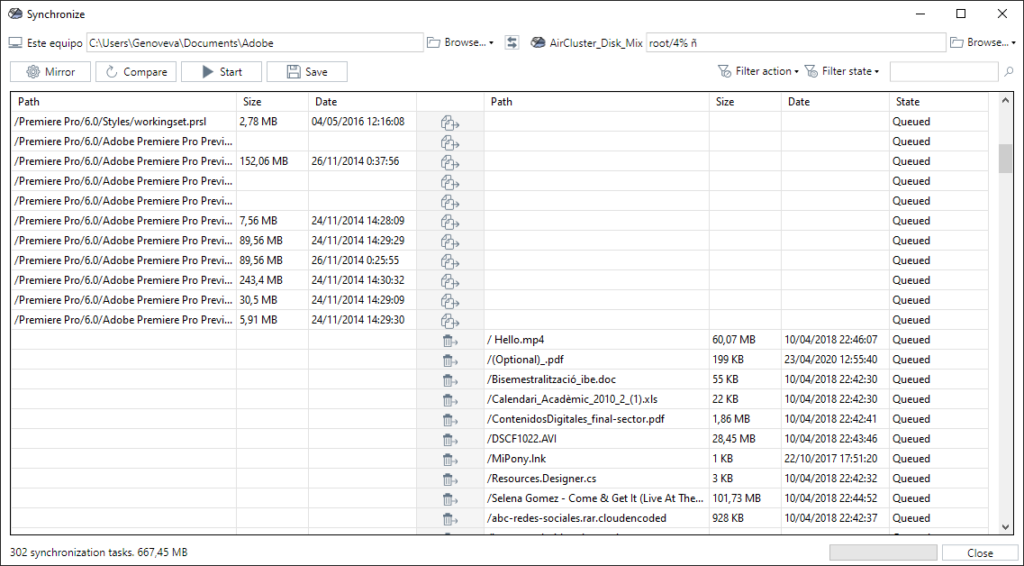
- Task Setup: Go to the Synchronize tool.
- Link Points: In the left panel, select your source folder (e.g., your local server or a project folder on your PC). In the right panel, select your Air Cluster.
- Action Type: Choose the logic that best fits your backup needs:
- Mirror: Exactly replicates the source to the cloud. If you delete a file on your PC, it will be deleted in the cluster to maintain absolute parity.
- Mirror Update: Similar to Mirror but optimized. It compares files and only transfers new or modified ones to ensure the destination is identical to the source, removing items in the destination that no longer exist in the source.
- Update: Only uploads new or modified files to the cluster. It never deletes files in the destination, making it ideal for cumulative backups.
- Bidirectional: Keeps both sides (PC and Cluster) identical. Any change on one side is reflected on the other.
- Customized: Allows the user to define specific rules on what to copy, delete, or skip.
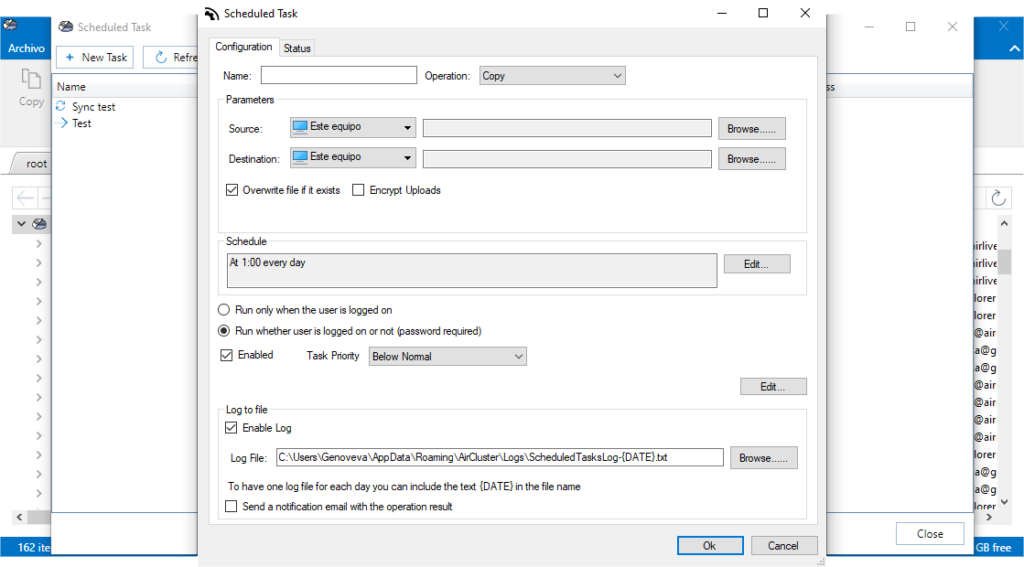
- Save and Schedule: Click Save to store this configuration. Then, access the Scheduler. Here you can define if the task runs:
- Daily at a specific time (e.g., 02:00 AM to avoid saturating office bandwidth).
- Weekly.
- At system startup.
Advanced Security: The B2B Value Add
For corporate environments, scheduled management isn’t enough without robust security. Air Cluster allows you to enable Encrypt Uploads. This means that before any file leaves your computer for the cluster, it is encrypted using advanced algorithms. Even if a cloud provider suffers a security breach, your files remain unreadable to third parties.
Conclusion: A Smarter Workflow
Managing your clusters on a scheduled basis means moving from “reactive mode” (backing up only when you remember) to “proactive mode” (a system that works for you). Air Cluster doesn’t just give you space by summing up clouds; it gives you back time through automation.
You can check more information about more features here:
-Air Cluster vs MultCloud: Which One Do You Actually Need?
-Cloud Automation: Discover the Air Cluster Task Scheduler
-How to Create an Unlimited “Virtual Hard Drive” by Joining Your Free Clouds
