


Free way to join Google Drive, Dropbox and Mega
Why join multiple cloud accounts for free
Cloud storage has become essential for work, study and personal projects. But as storage needs grow, many users face the same problem: running out of space on their main cloud service. Instead of paying for upgrades, people often create multiple free accounts across Google Drive, Dropbox and Mega. The result? Scattered files, separate logins, and a fragmented workflow.
Managing all these accounts manually is time‑consuming and inefficient. That’s why Air Cluster is such a powerful solution. It allows you to combine multiple cloud accounts into one large virtual cloud, completely free. With Air Cluster, you can join Google Drive, Dropbox and Mega into a single unified storage space and manage everything from one interface.
In this guide, you’ll learn exactly how to join your cloud accounts for free and unlock a much larger, organized and more efficient multi‑cloud environment.

What it means to “join” cloud accounts
Joining cloud accounts doesn’t mean syncing them or transferring files manually. Instead, it refers to creating a cluster that merges multiple cloud accounts into a single virtual drive.
Cluster vs. Syncing vs. Cloud‑to‑cloud transfer
- Cluster: merges accounts into one virtual drive without moving files.
- Syncing: keeps two locations updated by copying files between them.
- Cloud‑to‑cloud transfer: moves files from one cloud to another.
Creating a cluster is the only method that expands your storage without transferring or duplicating files.
How unified storage works in Air Cluster
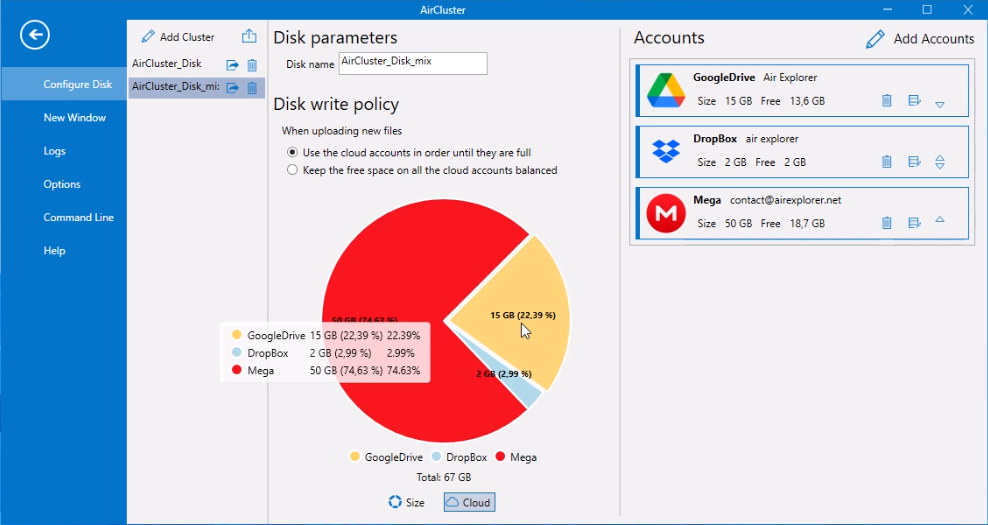
Air Cluster distributes files across your connected accounts automatically. You upload to the cluster, and the software decides where to store each file based on available space.
Benefits of cloud clustering
- More storage without paying for upgrades
- One interface for all your clouds
- Faster organization and easier navigation
- Ideal for multi‑cloud workflows and large projects
Why Air Cluster is the best free tool to join Google Drive, Dropbox and Mega
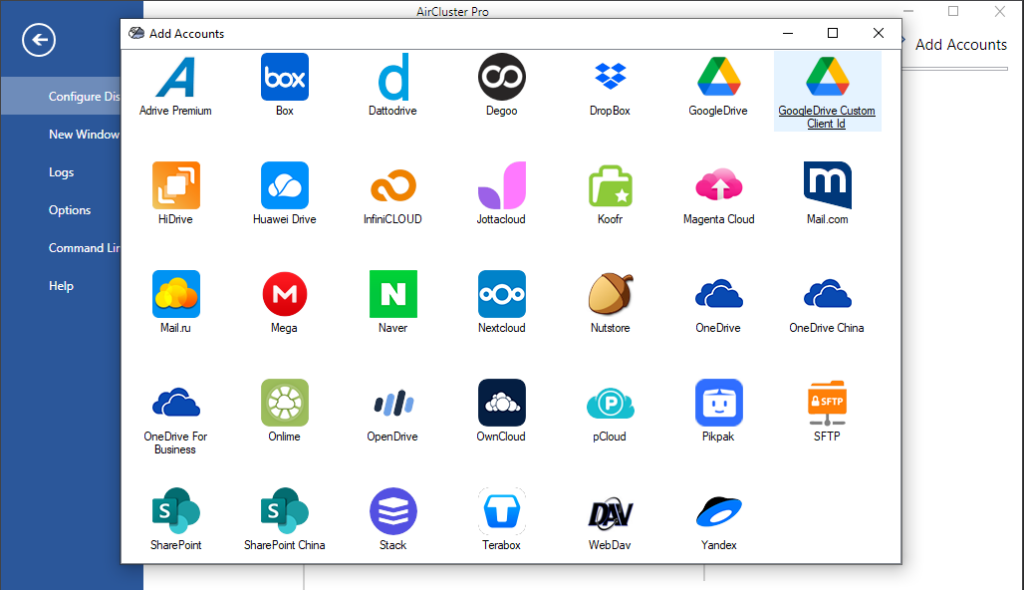
Air Cluster is designed specifically for creating clusters. It supports dozens of cloud services and allows you to combine multiple accounts from each provider.
Free version capabilities
- Add multiple Google Drive accounts
- Add multiple Dropbox accounts
- Add multiple Mega accounts
- Create clusters mixing all these services
- Browse all clouds as one unified drive
Key advantages
- No need to upgrade cloud plans: use all your free storage.
- No manual transfers: files stay in their original clouds.
- One login: access all clouds from a single interface.
- Supports encrypting files on upload.
Air Cluster gives you a simple and free way to unify your cloud storage.
How to join Google Drive, Dropbox and Mega for free (Step‑by‑Step Guide)
- Download and install Air Cluster: Get the software from the official website and install it on your computer.
- Create a new cluster and name it: Open Air Cluster and click Create Cluster. Choose a name that represents your unified cloud.
- Add your Google Drive accounts: Connect one or several Google Drive accounts.
- Add your Dropbox accounts: Repeat the process to add all your Dropbox accounts.
- Add your Mega accounts: Add your Mega accounts to expand your total free storage even more.
- Check the cluster capacity: Air Cluster will show the total combined storage of all your connected clouds.
- Start using your unified cloud: Browse, search and manage all your clouds as if they were one large drive.
What you can do after joining your clouds
Once your cluster is ready, you can:
- Expand your total free storage by combining multiple accounts.
- Upload files to the cluster and let Air Cluster distribute them automatically.
- Search across all clouds at once, saving time and effort.
- Use the cluster as a single large drive for backups, archives or big projects.
- Manage personal and work clouds from one unified interface.
This setup is perfect for users who want more storage without paying for premium plans.
Use cases: Who benefits from joining Google Drive, Dropbox and Mega
Air Cluster is ideal for:
- Students who need more free storage for assignments and projects.
- Freelancers managing multiple client accounts.
- Users with old or unused cloud accounts who want to reclaim that storage.
- Content creators working with large media files.
- Anyone needing a free multi‑cloud backup solution.
Conclusion
Air Cluster offers the easiest and completely free way to join Google Drive, Dropbox and Mega into one large virtual cloud. By clustering your accounts, you gain more storage, better organization and a unified multi‑cloud experience without paying for upgrades.
Download Air Cluster today and start combining your cloud accounts for free to unlock the full potential of your cloud storage.
You can check more information about more features here:
-The hidden risks of manual sync and how Air Cluster’s sync tool avoids them
-Migrating from Dropbox and OneDrive to PikPak
-File organization across clouds
